

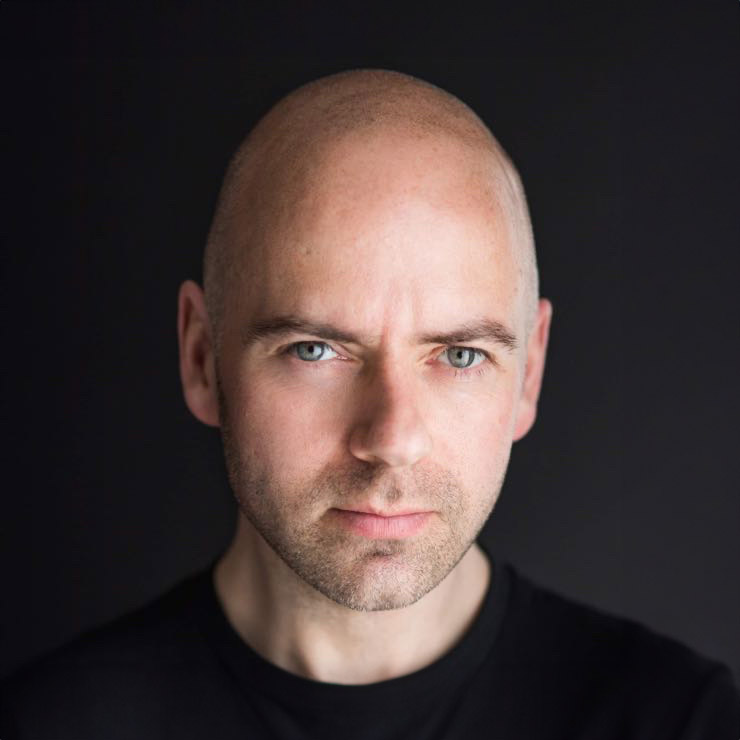
A weak LinkedIn photo rarely fails because someone is unattractive. It usually fails because it sends the wrong signals in a split second. A strong LinkedIn photo before and after example makes this obvious very quickly: the person is the same, but the impression is completely different.
That difference matters more than most people realise. Recruiters, clients, collaborators and employers are not studying your profile picture for minutes. They are scanning. In that short glance, your photo helps answer a few quiet questions. Do you look credible? Do you seem approachable? Do you look current, professional and confident enough to trust with a conversation?
What a LinkedIn photo before and after example really shows
When people search for a LinkedIn photo before and after example, they are often expecting a dramatic makeover. In reality, the best transformations are usually subtle. The goal is not to make you look like someone else. It is to remove distractions and bring forward the version of you that already belongs in your professional world.
In the “before”, we often see a cropped holiday photo, a dim indoor snapshot, a stiff expression or an image taken from too far away. None of those choices automatically ruin a profile, but they can make you look less engaged, less polished or simply less memorable.
In the “after”, the change tends to come from control. Better lighting shapes the face cleanly. A more intentional crop brings your eyes into focus. Wardrobe choices support your role rather than competing with it. Most importantly, expression coaching helps you look relaxed and self-assured instead of tense or guarded.
That is why a before-and-after is so useful. It shows that a better LinkedIn photo is rarely about heavy retouching. It is about better decisions.
The biggest changes in a LinkedIn photo before and after example
Expression shifts first impressions
Expression is often the most powerful difference between an average photo and one that works hard for your career. In many “before” images, people wear the expression they think they should have in a professional setting – serious, flat or slightly frozen. The result can read as uncomfortable, stern or distant.
In a well-made “after” image, the face looks more connected. That does not always mean a broad smile. It might be a calm, slight smile with relaxed eyes. It might be a more neutral expression that still feels open and present. The right expression depends on your industry, seniority and the sort of opportunities you want to attract.
A solicitor, actor, consultant and personal trainer should not all use exactly the same facial expression. Professional does not mean identical.
Lighting creates credibility
Bad lighting makes people look tired, shiny, shadowed or washed out. It can flatten features or exaggerate under-eye darkness. Even if viewers cannot explain what feels off, they notice it.
In the “after”, good lighting makes the face look clear and alive. Skin looks natural. Eyes have more brightness. Features appear balanced. You still look like yourself, just on a very good day.
This is one reason smartphone selfies and casual office snaps often struggle on LinkedIn. The issue is not the camera alone. It is the lack of controlled lighting.
Background and framing remove distractions
A common before photo includes a busy office, a pub, a wedding crop or a random wall at home. These backgrounds can pull attention away from your face or make the image feel accidental.
In the “after”, the framing is intentional. Your face is large enough to read well, even as a small thumbnail. The background supports the image instead of competing with it. Clean does not have to mean boring, but it does need to be appropriate.
If you work in a more corporate environment, a simple neutral background often works well. If you are a creative or entrepreneur, there may be a bit more flexibility. The test is straightforward: does the overall image still say “professional first”?
Styling supports the message
Clothing choices can quietly strengthen or weaken a headshot. In a before image, people are often wearing whatever happened to be on that day. A creased shirt, busy pattern or faded top can make the photo feel less considered.
In the after image, styling tends to feel cleaner and more deliberate. Colours are chosen because they flatter skin tone and sit well on camera. Necklines are neat. Layers add structure when needed. Nothing feels overdone, but everything helps the subject look more put together.
This does not mean dressing in a way that feels false. If you never wear a suit, forcing one for your LinkedIn photo may create a polished image that does not feel believable. The best result usually sits one step smarter than your normal working presentation.
Why the “after” works better psychologically
A good headshot does more than show your face. It reduces uncertainty.
People trust what feels clear and consistent. If your profile says you are a capable professional, but your photo looks casual, old or awkward, there is friction. Most viewers will not consciously analyse that mismatch, but they feel it. A stronger image closes the gap between how you want to be seen and what people actually perceive.
There is also a confidence effect. When people like their profile photo, they tend to use LinkedIn more actively. They post more readily, connect more confidently and present themselves with less hesitation. That matters. Your photo does not just change how others see you. It can change how you show up.
One realistic before-and-after scenario
Imagine a finance manager using a cropped picture from a friend’s wedding. The lighting is warm and patchy. Part of another person’s shoulder has been cut out of the frame. Their smile is pleasant, but the image feels social rather than professional. On LinkedIn, that photo suggests “this will do” rather than “I take my professional presence seriously”.
Now picture the after version. The clothing is still recognisably them, but better chosen for camera. The lighting is even and flattering. The crop is tighter. Their posture is stronger, and their expression is warm without looking overly casual. Nothing about the person has fundamentally changed, yet the new photo communicates competence, clarity and approachability.
That is the kind of improvement people respond to. Not glamour. Not perfection. Relevance.
What people often get wrong about headshot transformations
One concern comes up again and again: “I do not want to look too corporate” or “I do not want it to look overly edited.” That concern is fair. Some LinkedIn photos do look generic, stiff or over-retouched.
A good photographer avoids that by matching the image to the person and the context. A senior executive may need a polished, authoritative look. A creative freelancer may need more warmth and personality. A job seeker may need something broadly professional and versatile. There is no single right formula.
The trade-off is usually between polish and relatability. Go too formal, and you can look distant. Go too casual, and you may lose credibility. The strongest headshots sit in the middle, where you look capable, current and easy to talk to.
How to create your own strong “after” image
If you are comparing your current profile photo against a better LinkedIn photo before and after example, start by asking a more useful question than “Do I look good?” Ask, “What impression does this create in two seconds?”
If the answer is unclear, outdated or unhelpful, it is time for a better image.
Preparation helps more than people think. Choose clothes that fit well and suit your role. Think about whether you want to come across as more approachable, more authoritative or more dynamic. Get clear on where the image will be used. A LinkedIn headshot may also need to work on your company website, speaking bios or press features.
Then comes the part many people worry about most: being photographed. This is exactly where guidance changes everything. Most professionals are not models, and they do not need to be. With clear direction on posture, expression and small adjustments, people usually look far better than they expected. At Newcastle Headshots, that coaching element is often the difference between “I hate having my photo taken” and “actually, that looks like me on a good day”.
When a new LinkedIn photo is worth it
Not everyone needs a new headshot every year, but there are clear moments when updating it makes sense. If your current image is more than a few years old, if your appearance has changed noticeably, or if your role has become more senior or client-facing, your photo may no longer match your professional position.
It is also worth updating if your current picture was never really fit for purpose in the first place. Many people put off changing it because the task feels awkward, not because the image is working.
A better photo will not magically create opportunities on its own. It will not replace experience, skill or a strong profile. But it does help those things land more effectively. And on LinkedIn, where first impressions happen fast, that is not a small advantage.
The best before-and-after examples are reassuring for one simple reason: they show that you do not need to become more photogenic. You need the right setup, the right direction and an image that looks like the professional you already are.


