

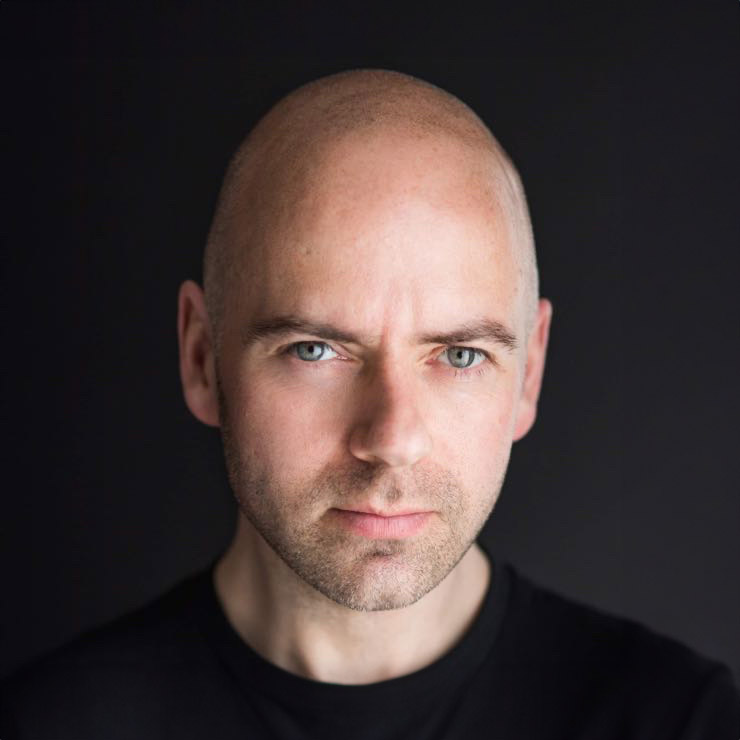
A prospective client has found your company website, checked that you offer the right service and reached the team page. At that point, headshots for company websites are doing more than filling a space beside a biography. They are answering a quiet but important question: do these look like people I would trust with my business?
A strong company headshot makes that answer feel easy. It gives your business a human presence, helps visitors recognise who they are speaking to and supports the credibility built by the rest of your website. A mismatched collection of holiday snaps, cropped group photos and outdated portraits can have the opposite effect, even when the team itself is excellent.
Why headshots for company websites matter
People make quick judgements online. Before they read every case study or compare every service, they look for signs that a business is established, professional and approachable. Your team photographs are one of those signs.
This is especially true for businesses where clients are buying expertise, advice or a relationship. Accountants, solicitors, recruiters, consultants, estate agents, healthcare professionals and creative teams all benefit when visitors can put a confident, friendly face to a name. For smaller businesses, good photography can also make the team feel more established without making it feel distant or corporate.
The aim is not to make everyone look identical or overly polished. It is to present people at their best in a way that feels believable. A relaxed expression, flattering light and a consistent visual style say far more than a stiff pose ever could.
There is also a practical benefit. The same images can support staff bios, LinkedIn profiles, proposals, press features, email signatures and speaker profiles. When the image used across these places is current and consistent, people are more likely to recognise your team when they move from your website to a meeting or call.
What makes a company headshot effective
The most useful headshots balance professionalism with personality. A website visitor should see someone who looks capable, but also someone who seems comfortable to contact. That balance will vary by industry.
A law firm may need a more polished, formal look. A marketing agency can usually show more colour and individual character. A trades business might benefit from practical, work-focused portraits that reflect the environment clients expect to see. The right approach depends on your brand, your audience and the impression you want to create.
Consistency matters, but it does not mean placing every person in the same outfit or asking them to make the same expression. Usually, it comes from shared decisions around background, lighting, crop, editing and overall tone. When these elements match, the page feels organised while each team member still looks like themselves.
The quality of expression matters just as much. Many people assume they are not photogenic because they dislike being photographed. More often, they simply have not been given clear direction. A professional photographer should help with posture, where to look, what to do with shoulders and hands, and how to find an expression that looks natural rather than forced.
Approachable does not mean informal
A friendly headshot is not necessarily a broad grin, and a professional one is not necessarily serious. The best expression depends on the person and their role. Someone working in client services may benefit from an open, warm smile, while a senior adviser may need a calm, composed expression that still feels welcoming.
The key is to avoid the two extremes: photographs that look so casual they weaken confidence, and photographs that are so formal they create distance. Your headshots should feel like the people clients will actually meet.
Plan the shoot around your website, not just the camera
Before booking a team session, look at your current website from a visitor’s point of view. Are headshots used beside individual profiles, across a leadership page or throughout service pages? Do you need portrait and landscape crops? Will the images sit against a white background, a coloured panel or full-width banner?
These details affect how photographs should be composed. A headshot that looks excellent on LinkedIn may not work as well in a narrow website profile card if there is no room around the subject. Planning for the intended layout helps ensure the final images look good where they matter most.
It is also worth agreeing whether new starters will need matching images later. Choosing a repeatable setup makes it much easier to add team members without your website gradually becoming inconsistent again. This is particularly useful for growing companies, where recruitment pages and staff directories need regular updates.
For larger teams, decide who needs a headshot and what information you need from them before the day. Clear timing and simple preparation notes reduce delays. A well-organised session should still feel unhurried for the person in front of the camera.
Help your team feel comfortable on camera
The biggest barrier to better team photography is rarely logistics. It is nerves. Most people are not used to being photographed alone, and telling them simply to “relax” is not useful advice.
Good preparation starts with reassurance. Let the team know why the images are being taken, where they will appear and how long their session will take. Explain that they do not need to know how to pose. That is the photographer’s job.
Clothing guidance should be clear without becoming restrictive. Solid colours tend to photograph well, while very busy patterns, large logos and extremely bright white can draw attention away from the face. Encourage people to choose something that fits well and feels like them. If everyone is asked to wear the same colour or style, the result can look more like a uniform than a genuine team.
A little care on the day helps too. Give people enough time to settle, check collars and hair, and avoid scheduling their photograph immediately after a demanding meeting. If possible, show them a few images during the session. Seeing that they look better than expected is often the moment their confidence changes.
At Newcastle Headshots, guided direction and image review are central to making the experience feel straightforward, even for people who normally avoid the camera.
Choose a style that supports your brand
Studio headshots are often the most reliable option for company websites because they offer control and consistency. A simple background keeps attention on the person, and the same lighting can be recreated as your team grows. This is a strong choice if your site has a clean, professional design or if staff work in different locations.
Environmental portraits can work well when your setting says something useful about the business. An architect in a bright studio, a chef in a considered kitchen or a business owner in their workspace can add context and personality. The trade-off is that backgrounds can date more quickly, vary with light and become distracting if they are too busy.
Some companies use both. They choose consistent studio portraits for profile pages, then commission more relaxed workplace images for social media, recruitment and editorial content. There is no single right answer. The priority is that the style fits the message your business wants to send.
Do not let your website photographs become out of date
Team pages are often treated as a one-off task, then forgotten for years. But a photograph from ten years ago can create an awkward first meeting, particularly when someone has changed role, appearance or confidence. It may also suggest that the business is not paying attention to its digital presence.
Review your headshots when there is a major change in branding, a new website launch, a leadership change or a noticeable period of team growth. For many businesses, updating every two or three years is sensible. That said, there is no need to replace an image simply because it is not brand new. If it remains accurate, well-lit and aligned with your current brand, it may still be doing its job.
Make updates part of your onboarding process, rather than waiting until a page looks uneven. A new team member should have a professional image ready when their profile goes live. This protects the consistency you worked to create in the first place.
A better first impression starts with real people
Company websites can be full of polished claims, but the people behind those claims are what make a business believable. Well-planned headshots give visitors a clearer sense of who they will deal with and give your team an image they can use with confidence.
The most successful portraits are not about looking perfect. They are about looking present, capable and approachable. Give people the right guidance, create a style that suits your brand and keep the images current. Your website will feel more human from the first click.


